Camera and Alarm Systems
High-resolution camera and alarm protection — systems that do not just record, but show who did what.
High-resolution IP and AHD camera systems, motion-sensing alarms and mobile monitoring. We do not install cameras merely to capture footage — we install them sharp enough to identify a person or read a plate when something actually happens.
What Does a Camera System Actually Solve?
A security camera system does three separate jobs: it deters, it alerts in real time, and it produces evidence after the event. Most installations manage the first two and fail at the third — the recording exists, but you cannot make out who arrived or what the plate read.
The reason is not how many megapixels the camera has, but how many pixels the subject occupies in the image. An 8 MP camera set up to fit an entire garden into one frame still will not resolve the face of someone at the door. So the first question we ask on every camera is: what do you expect from this view — to see movement, or to identify a person? The answer changes both the count and the placement.
What We Offer
- High-resolution IP and AHD camera systems
- Night vision, motion detection and smart analytics (face, plate, people counting)
- Wired and wireless alarm systems with motion sensors
- Remote mobile monitoring and cloud recording options
- 24/7 recording and backup solutions
Camera and Alarm Solutions
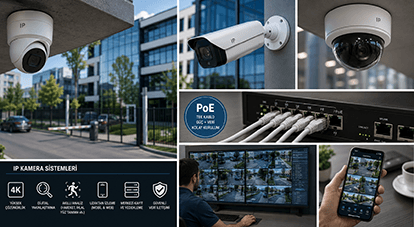
IP camera systems
Network-based installation carrying power and data over a single cable (PoE). This is the infrastructure required for high resolution, digital zoom and smart analytics — our default choice on new projects.
- Resolution4 – 8 MP
- CablingCAT6 / PoE
- RecordingNVR + backup
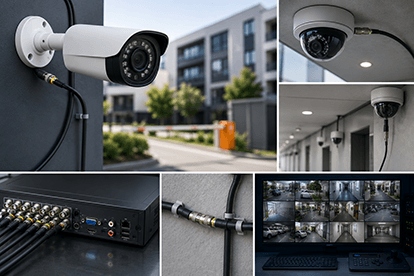
AHD systems and upgrades
The way to raise resolution without pulling out existing coaxial cable. In buildings with older analogue systems it delivers a clear quality jump with no re-cabling cost.
- CablingExisting coaxial
- BenefitNo re-cabling
- RecordingDVR / hybrid
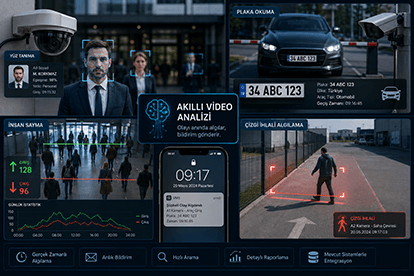
Smart video analytics
Face recognition, plate reading, people counting and line-crossing detection. Instead of reviewing footage afterwards, you are notified as the event happens. Runs on the same infrastructure as our plate recognition systems.
- AnalyticsFace / plate / counting
- AlertsReal-time to mobile
- BenefitNo footage trawling
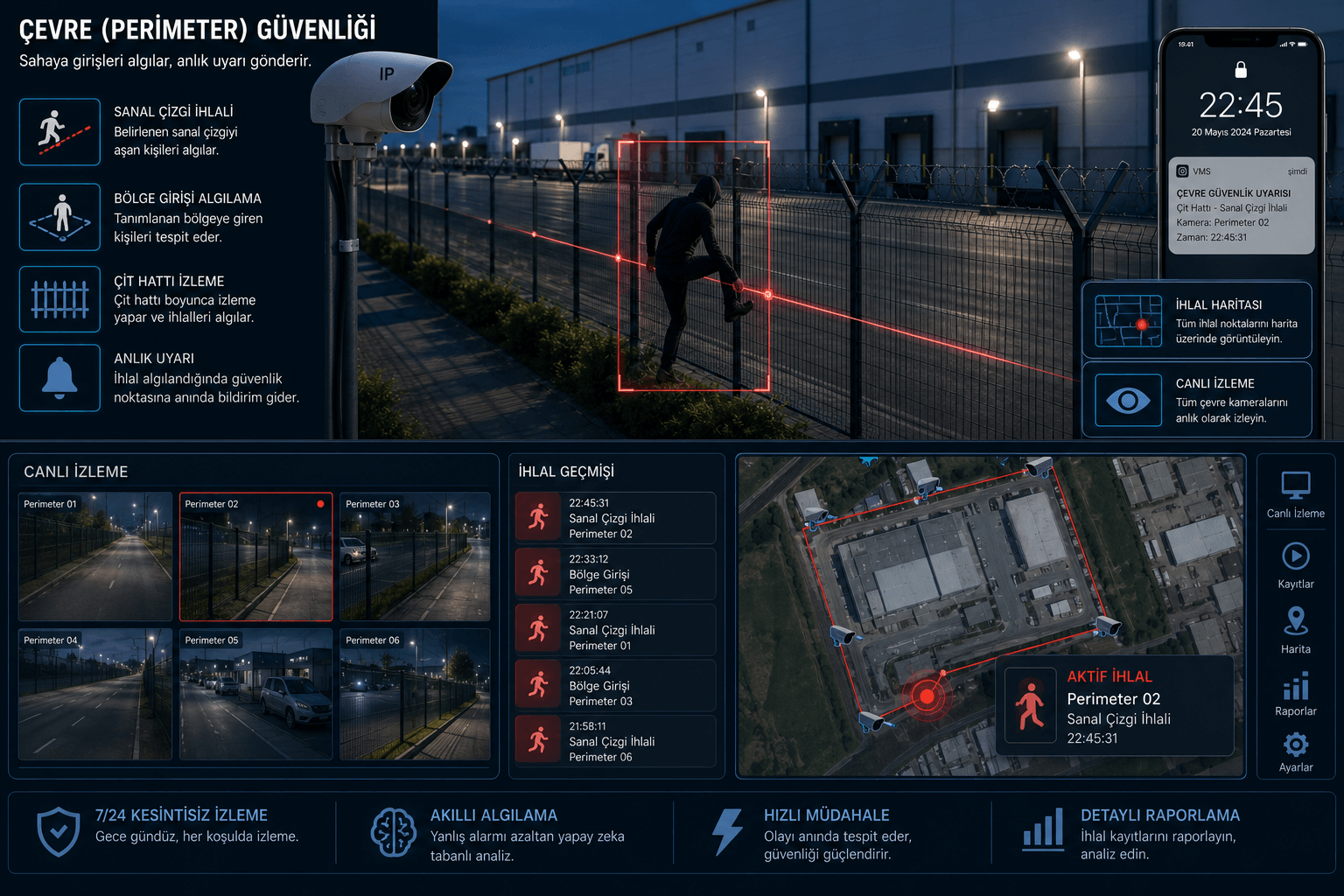
Perimeter security
Fence-line monitoring at factories and warehouse yards. Virtual line crossing and zone intrusion detection send an immediate alert to the security desk the moment someone enters, so nobody has to trawl footage in the morning.
- DetectionLine / zone intrusion
- NightIR or white light
- ExtraAudio warning broadcast
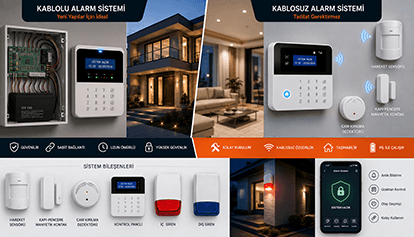
Wired and wireless alarms
Motion sensors, door and window contacts, glass-break detectors and internal or external sirens. Wireless systems suit occupied homes because they need no building work; wired systems suit new construction.
- SensorsPIR / contact / glass
- CommsGSM and IP
- ArmingApp / keypad
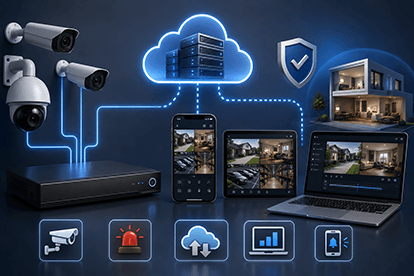
Mobile monitoring and cloud recording
Cameras and alarm in a single app. The real benefit of cloud recording is this: even if the recorder is stolen or smashed, the footage is still yours. Using it alongside local recording is the most robust setup.
- MonitoringOne mobile app
- RecordingLocal + cloud
- BenefitSurvives device loss
The Real Measure: Pixels Per Metre
Image quality is set not by the camera's megapixel count but by the pixel density on target at the distance where the subject actually stands. International video surveillance guidance defines four levels. We decide which level each camera is aiming at before anything is mounted.
| Level | Approx. density | What you get | Where it is enough |
|---|---|---|---|
| Detect | ~25 px/m | That a person or vehicle is present | Wide yards, perimeter lines |
| Observe | ~60 px/m | What they are doing, where they go | Car parks, corridors, common areas |
| Recognise | ~125 px/m | Identifying someone you already know | Building entrances, tills |
| Identify | ~250 px/m | Facial detail of a stranger, plate characters | Doorways, access points, kiosks |
The practical consequence: any point where you need identification requires its own narrow-angle camera. A single wide-angle camera cannot both cover the garden and identify the person at the door. That is why we size camera counts by the number of identification points, not by the number of corners.
The four mistakes we see most often in the field
Cameras mounted so high they only see the tops of heads, no narrow-angle camera at the door, night recording never tested, and disk capacity bought without calculation so footage overwrites itself within four or five days. These are the first four things we check on every site we take over.
What the System Is Made Of
Camera body and lens
Bullet, dome and PTZ types serve different jobs. The decisive choice is lens angle: wide sees more but resolves less, narrow does the opposite.
NVR / DVR recorder
Channel count and supported resolution set the ceiling for how far the system can grow. We leave spare channels from the outset.
Surveillance-grade drives
Surveillance drives are built for continuous writing; a desktop drive fails quickly under that load. It is the most common cause of lost footage.
PoE switch and cabling
CAT6 cable and a switch with an adequate power budget. Long runs need fibre or an intermediate switch; cable quality directly affects image stability.
Night vision and lighting
IR illumination produces a black-and-white image. Colour at night needs white-light or high-sensitivity cameras — a critical difference anywhere a plate has to be read.
Alarm panel and zones
The building is split into zones that can be armed and disarmed independently, which is what lets you arm only the perimeter while you are home at night.
Sensors
PIR motion sensors, door and window contacts, glass-break detectors. Pet-immune sensors noticeably reduce false alarms.
Sirens and communicator
The internal siren deters, the external siren alerts neighbours, and the GSM/IP communicator notifies your phone and, if used, a monitoring centre.
Mobile app
Cameras and alarm on one app: live view, playback, arming and notification management on the same screen.
Cloud backup
Keeping critical camera footage off site. When the recorder is stolen or destroyed, this is the only evidence left.
Uninterruptible power supply
Recording continues through a power cut. Since some break-in attempts start by pulling the fuse, this item matters more than it looks.
Outdoor protection
Appropriate ingress protection, sealed junction boxes and heated housings where needed. A junction box taking water causes more faults than the cameras themselves.
Retention and Storage Calculation
"How far back can I go?" is a question about disk capacity. The figures below are approximations assuming H.265 compression and continuous recording; motion-triggered recording extends the window considerably.
| Installation | Resolution | For 15 days | For 30 days |
|---|---|---|---|
| 4-camera home | 4 MP | ~2.5 TB | ~5 TB |
| 8-camera business | 4 MP | ~5 TB | ~10 TB |
| 16-camera residential complex | 4 MP | ~10 TB | ~20 TB |
| 16-camera facility | 8 MP | ~18 TB | ~36 TB |
We ask for your target retention window during the survey and size the storage around it. Adding disks later is possible on most recorders, but getting it right up front is both cheaper and safer.
On the Alarm Side: Cutting False Alarms
An alarm system is judged not by how many sensors it has but by how rarely it goes off for nothing. An alarm that keeps crying wolf stops being armed within weeks, and the system is effectively dead. To prevent that:
- Sensor placementHeaters, air conditioning, moving curtains and direct sunlight all trigger PIR sensors; placement is planned around them.
- Pet immunitySensors that ignore movement below a given mass are essential in homes with pets.
- Zone designInterior and perimeter zones are defined separately so you can arm only the perimeter while at home.
- Video verificationWhen the alarm trips, the relevant camera view reaches your phone so you can tell a real event from a false one without leaving.
Data Protection Responsibility
Camera footage is personal data, and the management company, business or institution running the system is the data controller. A homeowner installing cameras for personal use sits in a different position, but a camera permanently recording a neighbour's garden or public space still creates a problem. We hand the installation over with that framework in place.
- SignageVisible notices at the entrances to monitored areas.
- Field of view limitsCameras are aimed to cover your own property; neighbouring gardens and public space are kept out of frame.
- Retention periodHow long footage is kept is defined, with automatic deletion once the window passes.
- Audio recordingAdding audio is a more sensitive matter; unless it is genuinely needed we recommend leaving it off.
Note: this section is general information, not legal advice.
From Survey to Handover
-
Free survey and risk assessment
We walk the entry points, blind spots and the assets that need protecting with you. The target level for each camera — observe or identify — is settled at this stage.
-
Design and quotation
Camera count, lens angles, recorder capacity, disk size and alarm zones are decided. Cabling and infrastructure are itemised separately.
-
Cabling and infrastructure
Cable routes are pulled, trunking and junction boxes installed, power and network prepared. Weatherproofing is the critical item outdoors.
-
Installation and image setup
Cameras are mounted and angle and focus are set individually for each one. Recorder, storage and network configuration follow.
-
Night testing and alarm commissioning
The system is tested again after dark: IR range, glare and legibility are checked. Alarm zones are armed and tripped for real, and we confirm notifications reach the phone.
-
Handover, training and maintenance plan
App usage, playback and alarm arming are explained. Signage, the retention period definition and the maintenance schedule are handed over.
Who Is It For?
- Residential complex common areasEntrances, car parks, playgrounds and plant rooms, with controlled footage access for management.
- Retail and shopping centresIdentification at the till, people counting for footfall analysis, visible deterrence.
- Factory and warehouse perimetersFence-line monitoring, line-crossing alerts, recorded dispatch doors.
- Villas and detached homesGarden perimeter, identification at the door, mobile monitoring and alarm alerts while away.
- Offices and workplacesEntry records, out-of-hours movement alerts, operation alongside access control systems.
- Construction and temporary sitesMonitoring against material theft, with portable installation and mobile alerts.
What Scheduled Maintenance Covers
The most insidious fault in a camera system is one where everything looks fine but nothing is actually being recorded. We recommend annual servicing, or every six months at critical sites.
- Recording verificationChannel-by-channel confirmation that footage is being written and can be played back.
- Optical and mechanicalLens cleaning, checking whether camera angles have drifted, housing seals and water ingress.
- Disk and device healthDrive error reports, recorder temperature, firmware updates, and clock and timestamp accuracy.
- Alarm testingTripping each sensor individually and confirming siren and mobile notification.
More on our technical service and maintenance
Our Service Area: 11 Provinces, 158 Districts
Because we work with our own field team, we respond to breakdown calls without waiting on subcontractors. Within İstanbul we aim for same-day response; in the other provinces we work by scheduled appointment.
- İstanbul
- Kocaeli
- Bursa
- Sakarya
- Tekirdağ
- Balıkesir
- Çanakkale
- Edirne
- Kırklareli
- Yalova
- Bilecik
Why Cortek?
We install your cameras and alarm so you can monitor everything from a single mobile app, and we offer cloud and local recording together according to what you need. Our 24/7 technical support line means fast response when something fails.
Designed to a target level
We decide up front whether each camera is for observation or identification, then choose lens and position accordingly.
One app
Cameras and alarm are not split across separate apps: live view, playback and arming sit on the same screen.
Local and cloud together
Footage from critical cameras is also held off site, so evidence survives even if the recorder is stolen.
No handover without a night test
We test the system again in darkness and show you exactly what is and is not legible in the night image.
Integrated with access control
Because we also supply barriers, turnstiles and plate recognition, cameras can be designed together with access records.
24/7 technical support
Fast response on faults, with remote pre-checks at critical sites so we can often diagnose before the field team arrives.
Frequently Asked Questions
How many cameras do I need?
The count comes from what needs protecting, not from how many corners the building has. Each entrance needs a camera capable of identification, and wide areas need observation cameras. A typical detached house works out at four to six; a mid-sized business at eight to sixteen. We mark the blind spots together during the survey to reach a firm number.
Should I choose 4 MP or 8 MP?
For most applications 4 MP is more than enough; the real difference comes from lens angle and camera position. 8 MP earns its place when you want to cover a wide area from one camera and zoom in digitally afterwards. It also demands more storage and better low-light performance, so spending the budget on correct placement usually beats spending it on resolution.
How far does night vision reach?
IR range varies by model, and the figure in the brochure is an ideal-conditions number. Rain, fog and dust shorten it, and IR footage is black and white — anywhere you need plate or colour detail requires a white-light or high-sensitivity camera. This is why we run the night test with you before handover.
How many days of footage are kept?
Entirely a function of disk capacity. An 8-camera 4 MP system recording continuously needs roughly 5 TB for 15 days. With motion-triggered recording the same disk reaches much further back. We ask for your target window during the survey and size storage to match.
Can my existing analogue system be upgraded?
Yes. If the coaxial cabling is intact, AHD cameras deliver a clear resolution increase without re-cabling. Moving to IP requires CAT6, though in some buildings converters can carry IP over the existing coaxial as an interim step. We check the cabling during the survey and present both options with costs.
Does it work without internet?
Yes — recording is local, so the system runs and records without connectivity. Internet is only needed for remote viewing, mobile notifications and cloud backup. At sites with unreliable connections we run alarm communications over GSM.
Can I watch from my phone?
Yes. Cameras and alarm run in a single mobile app where you can view live, open recorded footage, and arm or disarm the alarm. We install the app on your phone during commissioning and try it together.
Can the camera see my neighbour's garden?
It should not. Cameras are aimed to cover your own property; continuously recording a neighbour's garden or public space creates a data protection problem. We check the framing with you during installation and apply software masking where needed.
Can audio be recorded?
Technically yes, but audio is considerably more sensitive than video and we recommend leaving it off unless it is genuinely required. Where it must be enabled, the notices need to reflect that.
What if the alarm keeps going off for nothing?
False alarms usually come down to sensor placement: heaters, air conditioning draughts, moving curtains or direct sun trip PIR sensors. Homes with pets need pet-immune sensors. Adding video verification means the relevant camera view reaches your phone the instant the alarm trips, so you are not driving home for nothing.
Does recording stop during a power cut?
Without an uninterruptible power supply, yes. Because some break-in attempts begin by pulling the fuse, we quote a UPS for the recorder and critical cameras as a standard item. Cloud backup is the second layer of protection against the same scenario.
What determines the price?
Five items: camera count and class, lens and low-light requirements, recorder and storage capacity, cabling and infrastructure work, and the scope of alarm and analytics. For the same camera count, the gap between quotations usually comes from storage capacity and night performance.
Let us walk your site and mark the blind spots together
Send us your address and the points you want covered; our team will visit, prepare a camera plan and an itemised quotation. Both the survey and the quotation are free.