Smart Home & Automation Systems
Automation that makes daily life easier — not switching lights on from your phone, but a home that does the right thing on its own.
Smart lighting, curtain and blind control, socket and appliance management, voice assistant integration and energy-saving automation scenarios. We don't build systems so that everything runs through an app — we build them so that your daily routine runs without you touching anything.
What Does Automation Actually Solve?
A smart home system delivers three separate benefits: comfort, energy savings and safety. Most installations cover the first, fall short on the second and never build the third. The reason is that the system is left at "switch it on and off from the app" level — the home never does anything by itself.
The most practical measure of a successful installation is this: how often do you open the app after the first month? In a well-built system you barely need your phone. Lights follow motion and time of day, blinds close with the sun, everything shuts down when you leave. The app is for when you're away or for exceptions. That's why we start a project with your daily routine, not with a device list.
What We Offer
- Smart lighting, curtain/blind and socket control
- Remote management through a mobile app
- Voice assistant integration (Google / Alexa)
- Energy-saving automation scenarios
- Security integration with door and window sensors
Smart Home Solutions
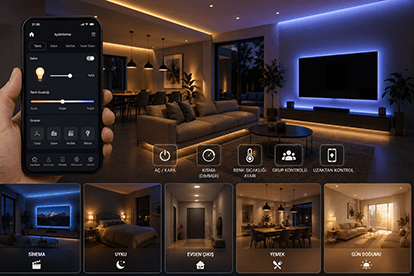
Smart lighting and scenes
On/off, dimming, colour temperature and group control. The real benefit isn't in individual bulbs but in scenes: "Movie", "Sleep" or "Leaving home" set the whole house with one tap — or with no tap at all.
- ControlSwitch / app / voice
- InstallSmart switch or relay
- Add-onMotion and daylight sensor
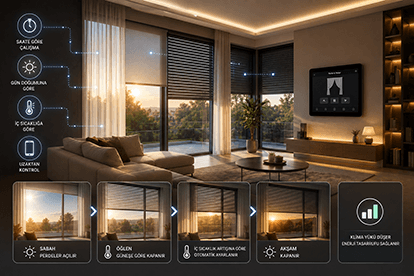
Curtain, blind and shutter control
Motorised curtains and shutters driven by time, sunrise or indoor temperature. Closing the sun-facing side of the house at midday in summer is the single most tangible way automation cuts cooling load.
- TriggerTime / sun / temperature
- RetrofitMotor on existing rail
- ControlWall button + app
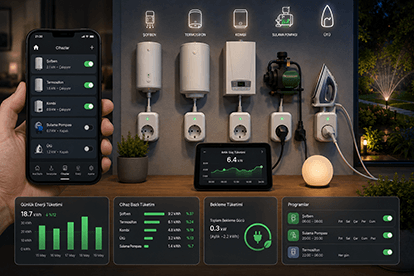
Socket and appliance control
Scheduled operation and remote shutdown for water heaters, boilers, irrigation pumps or irons. Energy-metering sockets show you what each appliance actually draws, so you can cut standby consumption.
- MeteringLive and total usage
- ScheduleTime / duration / condition
- SafetyAutomatic shutdown
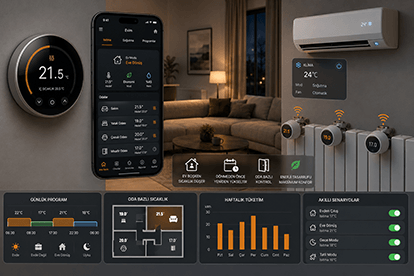
Heating and cooling automation
Smart thermostats, motorised radiator valves per room and air-conditioning control. Setbacks while the house is empty, pre-heating before you return, and room-level control so you stop heating rooms nobody uses.
- ControlThermostat / valve actuator
- ScenesHome – away – night
- Add-onPause on open window
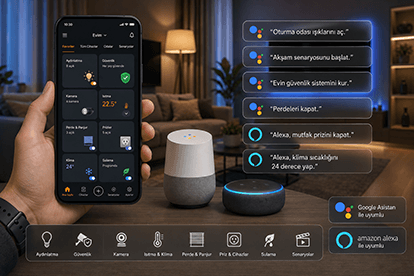
Mobile app and voice assistant
The whole system in a single app, with Google Assistant and Amazon Alexa integration. Voice control earns its place when your hands are full — and it makes a real difference for elderly users and people with reduced mobility.
- AppOne screen, many devices
- VoiceGoogle / Alexa
- AccessAt home and remote
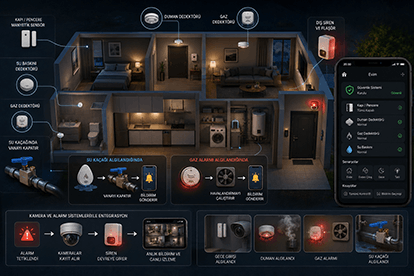
Security and hazard integration
Magnetic door and window contacts, water leak, smoke and gas detectors. On the safety side automation does more than notify: it shuts the water valve on a leak and starts ventilation on a gas alarm. It can share scenes with your camera and alarm systems.
- SensorsMagnetic / water / smoke
- ActionValve, siren, lighting
- AlertsInstant mobile notification
The Real Constraint: Your Existing Wiring
In smart home projects the first question isn't which brand — it's what your existing installation allows. In most homes in Turkey only the live wire reaches the switch box; the neutral is left in the ceiling junction box. Yet most smart switches need a neutral to work.
That single detail decides the whole method. If there is no neutral, there are two routes: use switch models that don't require one, or leave the switch alone and place a relay module in the ceiling junction box or behind the light fitting. The second option is usually cheaper, more flexible and leaves your walls looking exactly as they are. The first thing we do during the site visit is open a few switch boxes and see the situation for ourselves.
| Infrastructure | Cabling | Strength | Where it fits |
|---|---|---|---|
| Wired bus (KNX etc.) | Dedicated bus line, laid during construction | Most stable, vendor independent, long life | Villas, hotels, offices; new build or full renovation |
| Wireless mesh (Zigbee / Z-Wave) | Wireless, requires a gateway | Low power; devices relay each other's signal | Occupied homes, no-renovation installs |
| Wi-Fi devices | Wireless, no gateway needed | Fast start, low entry cost | A few devices, a single room, trial setups |
| Thread / Matter | Wireless, requires a border router | Vendor independence and local operation | New installations and mixed-brand systems |
The practical conclusion: a wired bus in a building still under construction, a wireless mesh system in an occupied apartment. Mixing the two is perfectly valid as well — projects where the main lighting and blinds run on a wired bus while later additions are wireless are common. We choose the brand after this decision, never before it.
The four mistakes we see most often in the field
Systems the household can't actually use, where everything runs through a phone and the physical switch is left useless; cloud-dependent setups where the lights won't come on if the internet drops; gateways hidden behind steel doors or inside metal panels, killing wireless range; and locking into a single brand, only to find two years later that the device you want can't be added. We design every system to rule these four out from the start.
What the System Is Made Of
Gateway / controller
The brain of the system. It decides whether scenes run on the device or in the cloud; a locally running controller keeps the home working through an internet outage.
Smart switches and dimmers
They replace the classic wall switch. They must still work when pressed by hand — a switch that needs a phone annoys everyone in the house.
Relay modules (retrofit)
A small module fitted behind the switch box or the light fitting. Your existing switches stay in place and the walls are untouched; this is what makes renovation-free installation possible.
Curtain and shutter motors
A motor fitted to your existing rail, or a ready motorised system. The control module is wired so the wall button keeps working alongside the app.
Smart sockets and energy meters
Per-appliance switching and consumption metering. The only way to find out which appliance is quietly burning electricity is to measure it.
Thermostats and valve actuators
Boiler control plus motorised valves on each radiator. Room-level temperature control is the most effective way to save without giving up comfort.
Motion and presence sensors
A classic PIR sees movement; a presence (mmWave) sensor also detects someone sitting still. The second type is what stops the light going out while you're on the sofa.
Door and window contacts
Both a security alert and an automation trigger. Pausing the radiator while a window is open is one of the scenes that pays for itself fastest.
Water leak and gas detectors
Sensors under the washing machine, boiler and kitchen units; paired with a motorised valve they don't just report a leak, they shut the water off.
Scene buttons and keypads
Scene buttons on the wall or by the bed, so guests, children and older family members can use the system without reaching for a phone.
Network infrastructure
The invisible requirement behind stable automation is a solid network. We plan mesh Wi-Fi in larger homes and wired links wherever they're possible.
Backup power supply
A small UPS for the gateway, modem and alarm components, so notifications keep working through a power cut.
Scenes: What the System Does on Its Own
The value of an automation system lies in its scenes, not its device count. The table below summarises the setups we commission most often in homes and what each one delivers.
| Scene | Trigger | What the system does | Benefit |
|---|---|---|---|
| Leaving home | Last person leaves | Lights and selected sockets off, heating setback, alarm armed | Energy + security |
| Coming home | Location or time | Heating rises in advance, entrance lighting comes on | Comfort |
| Night mode | Set time or button | Shared areas go dark, dimmed night light comes on in the hallway | Comfort + safety |
| Sun control | Indoor temperature or time | Blinds close on the sun-facing side | Reduces cooling load |
| Window open | Magnetic contact | That room's radiator valve or air conditioner stops | Stops wasted heating |
| Water leak | Water sensor | Main valve closes, notification sent | Prevents damage |
| Holiday mode | Manual selection | Lights switch on and off as though someone were home | Deterrence |
During the site visit we go through this list with you and mark the ones that fit. Every commissioned scene is tested together at handover; a scene that doesn't work is a scene that wasn't installed.
Energy: Where Do the Savings Come From?
A smart home system will not halve your electricity bill on its own — treat any claim that it will with caution. Savings come from cutting loads that were running for nothing, and they accumulate in three places above all:
- Heating and coolingThe largest item by far. Setting the temperature back while the house is empty, and not heating unused rooms, makes a difference without costing you comfort.
- Lighting hoursMotion and daylight sensors cut how long lamps stay on. The effect is clearest in hallways, bathrooms, storage rooms and garden lighting.
- Standby consumptionDevices left permanently plugged in draw power quietly. We measure first with energy-metering sockets, then cut the unnecessary ones on a schedule.
- Never start without measuringMeasurement is the first step to saving. Automation built without seeing what each circuit consumes is built on guesswork.
Privacy, Cloud and Internet Outages
A smart home system processes movement inside your home, your habits and your voice commands. That is personal data, and where it is stored matters. We hand over every installation having discussed this framework with you.
- Local operation firstCore scenes — lighting, blinds, heating — are built to run without an internet connection; the cloud is used only for remote access and notifications.
- The physical switch always worksEven if the system is entirely down, the wall switch must still turn the light on. For us that is non-negotiable.
- Voice assistants and microphonesA voice assistant waits for its wake word and then sends the command to the cloud. In spaces such as bedrooms we suggest avoiding microphone-equipped devices, or muting the microphone physically.
- Accounts and accessEach household member gets their own access; guest and temporary access is time-limited, and access is revoked when someone leaves.
Note: this section is general information and does not constitute legal advice.
From Site Visit to Handover
-
Free site visit and routine analysis
We check the electrical infrastructure on site (neutral wire, junction box access, distribution board) and map out your daily routine together. The scope comes from that routine, not from a device list.
-
System selection and design
Wired or wireless, which gateway, which components in which rooms — all of it is settled here. You get an itemised quotation, and modules to be added later are written into the plan.
-
Infrastructure and cabling
In new builds the bus line and motor supply lines are laid. In occupied homes this step is usually skipped and the installation runs on the existing wiring.
-
Installation and commissioning
Switches, relay modules, motors and sensors are fitted, devices are paired to the system, and the gateway position is chosen for wireless range.
-
Scene programming and integration
Scenes are written, the voice assistant is connected and the mobile app is installed on the household's phones. Every scene is triggered and tested in front of you.
-
Handover, training and expansion plan
We walk through the app on site with everyone in the household. You also receive a written plan of how the system can be extended later, step by step.
Who Is It For?
- Villas and detached housesGarden lighting, irrigation, multi-floor scene management and security integration in one system.
- Premium apartments and residencesRenovation-free retrofit; blinds, lighting and air conditioning brought together in a single app.
- Offices and meeting roomsA meeting scene that sets lighting and blinds with one tap, plus automatic shutdown outside working hours.
- Hotel room automationKey-card power control, "do not disturb" indication, and heating or cooling reduced in unoccupied rooms.
- Holiday and second homesRemote management, pre-heating before you arrive, and temperature monitoring against flooding and freezing.
- Elderly and accessible useVoice control, large-button scene keypads and motion-triggered night lighting.
What Periodic Maintenance Covers
Faults in smart home systems usually come from updates and battery life rather than hardware. We recommend an annual check, or every six months in hotels and offices.
- Scene verificationTriggering every defined scene one by one and confirming it still behaves correctly.
- Batteries and sensorsMeasuring wireless sensor batteries and replacing weak ones; a sensor that dies quietly takes its scene down with it.
- Software updatesUpdating gateway and device firmware, verifying compatibility and confirming security patches are applied.
- Network and accessMeasuring wireless range, checking gateway placement and reviewing user permissions.
More about our technical service and maintenance
Our Service Area: 11 Cities, 158 Districts in Marmara
Because we work with our own field team, we respond to service calls without waiting on subcontractors. Same-day response within İstanbul, scheduled appointments in the other cities.
- İstanbul
- Kocaeli
- Bursa
- Sakarya
- Tekirdağ
- Balıkesir
- Çanakkale
- Edirne
- Kırklareli
- Yalova
- Bilecik
Why Cortek?
In smart home projects we decide the wired or wireless solution together with you, based on your existing electrical infrastructure, and we explain how to use the mobile app on site once the installation is done. When you want to extend the system later, it grows modularly.
Built around your wiring
Wired or wireless is decided by looking at your installation, not at a brand catalogue — and we decide it with you.
Modular growth
Start with one room and extend over the years; we build the system open to that expansion from day one.
On-site training
We show the app to everyone in the household. A system nobody uses is a system that was never installed.
Works without internet
Core scenes run locally and the physical switches always work. Your home is never left dependent on a connection.
Integrated with security
We also install cameras, alarms and access systems, so automation and security can share the same scenes.
24/7 technical support
Fast response when something fails; most software-related issues we resolve remotely, before a field team is needed.
Frequently Asked Questions
Can it be installed in an occupied home without renovation?
Yes — most projects run this way. Wireless systems need no chasing of walls or new cabling; relay modules sit behind your existing switch box or light fitting, and curtain motors mount on the rails you already have. A wired bus infrastructure only makes sense in new builds and full renovations.
What if there is no neutral wire in my switch box?
In most apartments in Turkey only the live wire reaches the switch box. In that case we either use switch models that don't require a neutral, or place a relay module in the ceiling junction box. The second option is usually more economical and leaves your existing switches in place. We open a few boxes during the site visit to see exactly what's there.
If the internet goes down, will my lights still work?
Yes. We install everything so the physical wall switch works under any condition, and we define core scenes on a locally running gateway so automation continues without a connection. The internet is only needed for remote access, notifications and voice assistants.
Is the voice assistant listening all the time?
The device waits for its wake word; once a command is detected, the audio is sent to the manufacturer's cloud for processing. That's why we suggest keeping microphone-equipped devices out of spaces like bedrooms, or muting the microphone with its physical button. The system works at full capacity without a voice assistant.
Does it really save energy?
It does, but it's worth understanding where the saving comes from: cutting loads that were running for nothing. The biggest item is heating and cooling — setting back the temperature while the house is empty and not heating unused rooms. Motion sensors on lighting and scheduled cuts to standby consumption add to it. Halving your bill is not a realistic promise; measuring first and building scenes around what you find is.
Which is better, a wired system like KNX or wireless?
Neither is better in the abstract — one of them fits your situation. In a villa, hotel or office still under construction, a wired bus is more stable and longer-lived. In an occupied apartment, wireless is the only sensible option because it needs no renovation. Mixed installations are common too: main circuits wired, later additions wireless.
Will devices from different brands work together?
With the right gateway, yes. Shared standards such as Matter and Zigbee have improved vendor independence considerably. Even so, not every device works flawlessly with every system, which is why we avoid locking a project into a single brand and account for future additions from the outset.
How long does installation take?
A typical apartment with lighting, blinds and a handful of sensors usually takes 1–3 days. Villas and multi-room projects take longer in line with scope. If a wired infrastructure is being laid in a new build, the work starts at the electrical installation stage and follows the construction schedule.
Can I extend the system later?
Yes, and we build for it. You can start with one room or with lighting alone and add blinds, thermostats and sensors afterwards. We hand over a written expansion plan and size the gateway capacity according to it.
Can I take the system with me if I move?
Most wireless installations can be removed and reinstalled elsewhere; smart switches and relay modules come out and the original switches go back in. A wired bus infrastructure is a permanent part of the building and stays. If you're renting, we plan the installation with that distinction in mind.
Can my existing curtains be motorised?
In most cases, yes. A motor is selected to suit your existing rail or track, and the same applies to roller, zebra and venetian blinds. During the site visit we check the rail type and whether there's a power point nearby, since the supply point directly affects the solution.
What determines the price?
Five items: the number of control points (how many lighting circuits, how many blinds), the choice between wired and wireless infrastructure, the gateway and device class, the scope of sensors and scenes, and cabling labour where infrastructure work is needed. Differences between quotations for the same apartment usually trace back to the point count and the infrastructure choice.
Let us see your home and map out your routine with you
Send us your address and the things you'd like automation to solve. Our team will visit, and we'll prepare a system suited to your infrastructure along with an itemised quotation. Site visits and quotations are free.